介绍
Kill Watermark脚本是一键去除图怪兽、易企秀、创客贴、比格设计、稿定设计、爱设计、标小智图片水印的脚本
可通过油猴脚本安装,脚本地址:https://greasyfork.org/zh-CN/scripts/424302-kill-watermark
稿定设计
1、作图完成以后按F12打开开发者工具
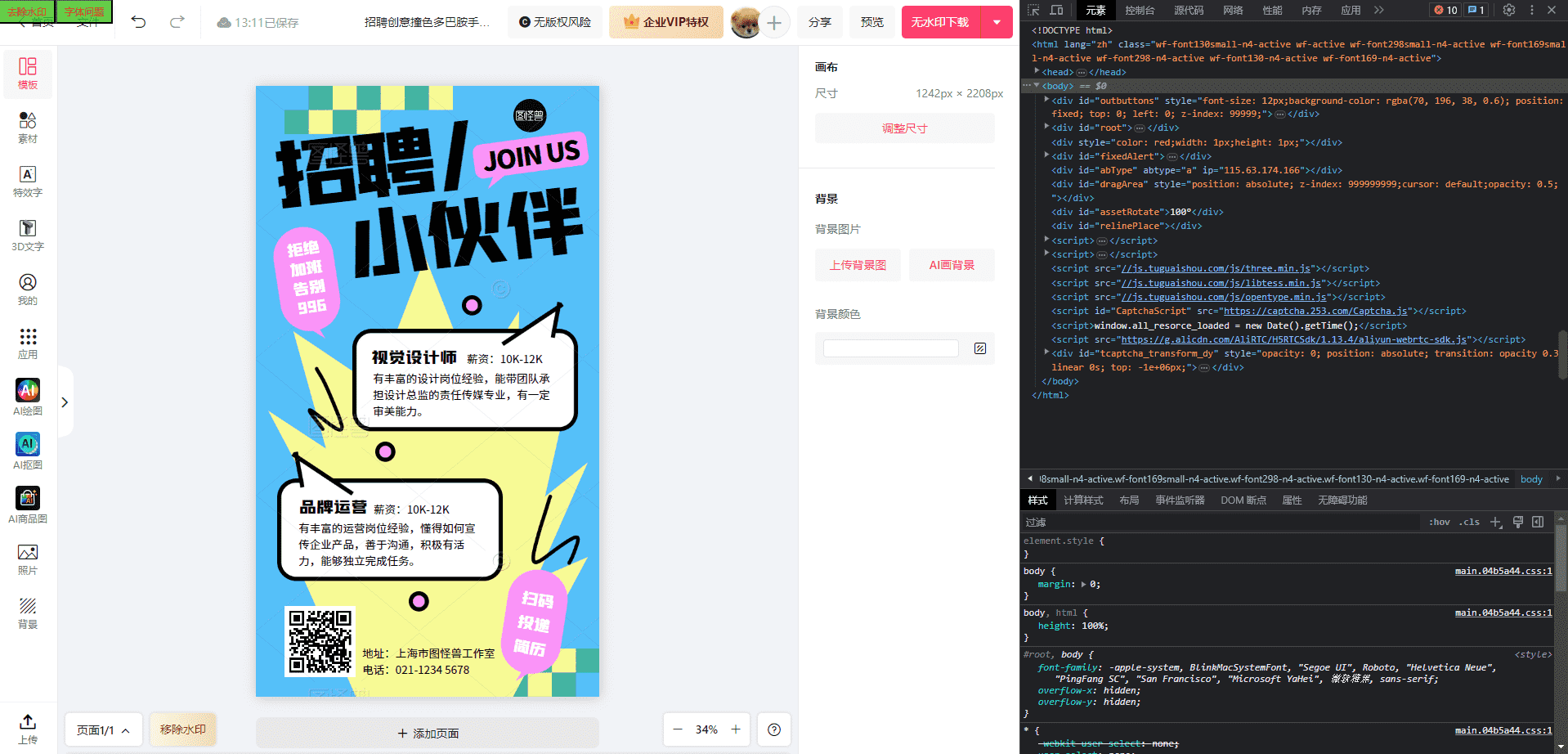
2、添加网络请求屏蔽 blob:https://www.gaoding.com/*-*-*-*-*
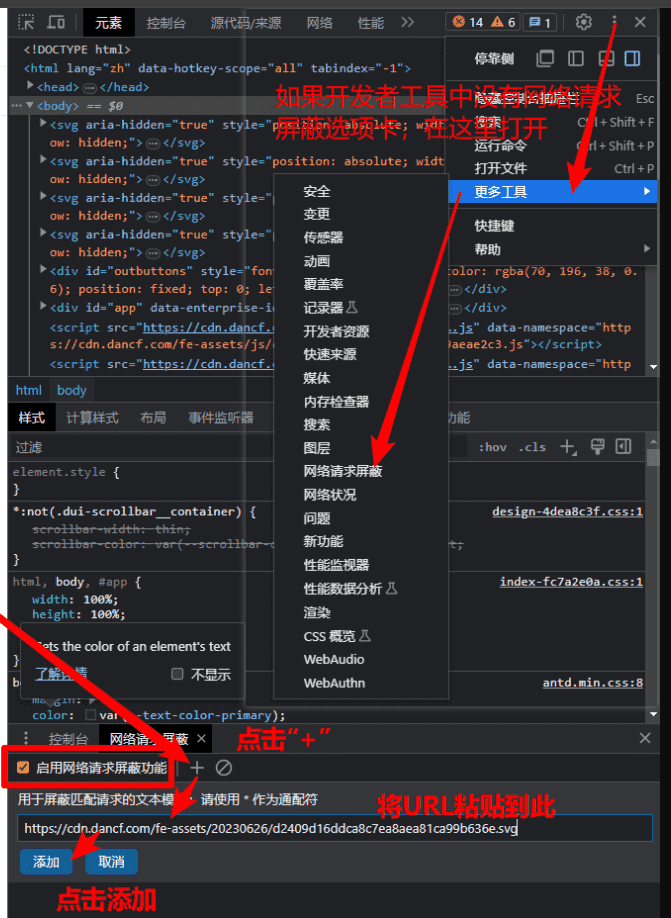
3、刷新页面,此时页面中已经没有水印了 4、鼠标移动到图片上,按住Ctrl+滚轮,调整图片大小 5、点击去除水印按钮,即可自动开始下载图片 6、选择保存位置后保存图片即可
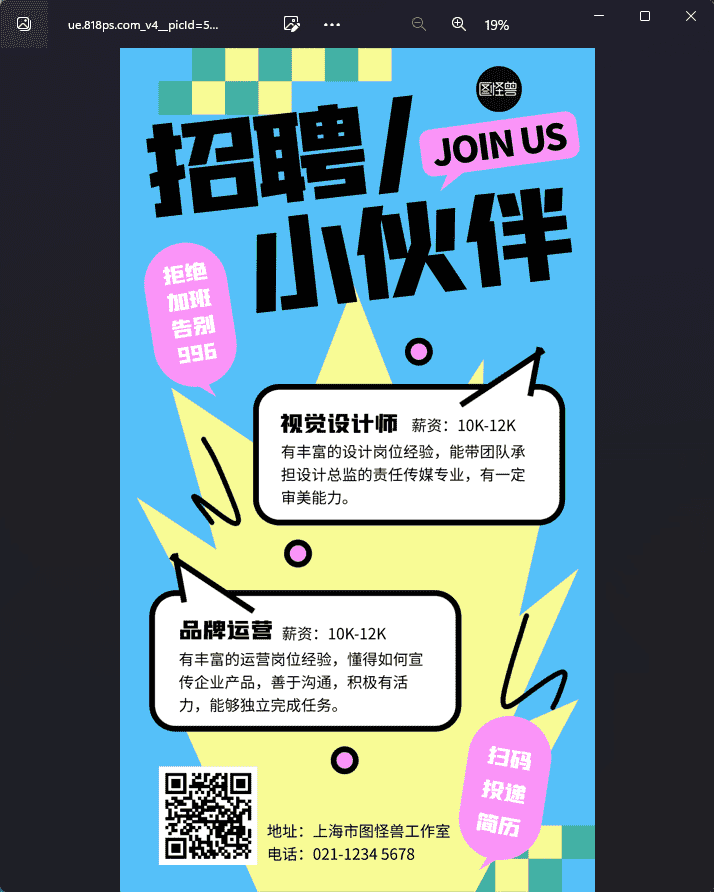
图怪兽
1、作图完成后按F12打开开发者工具
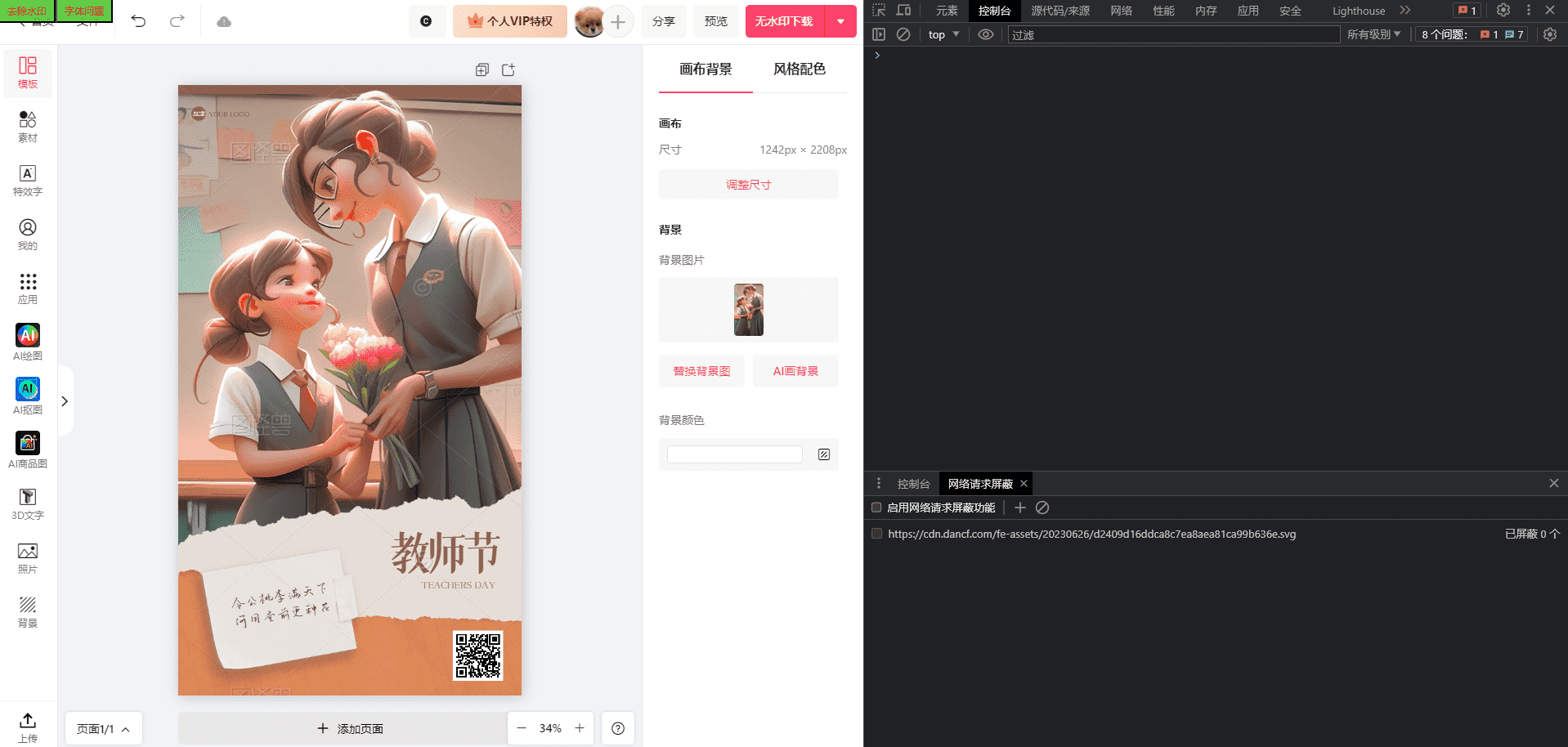
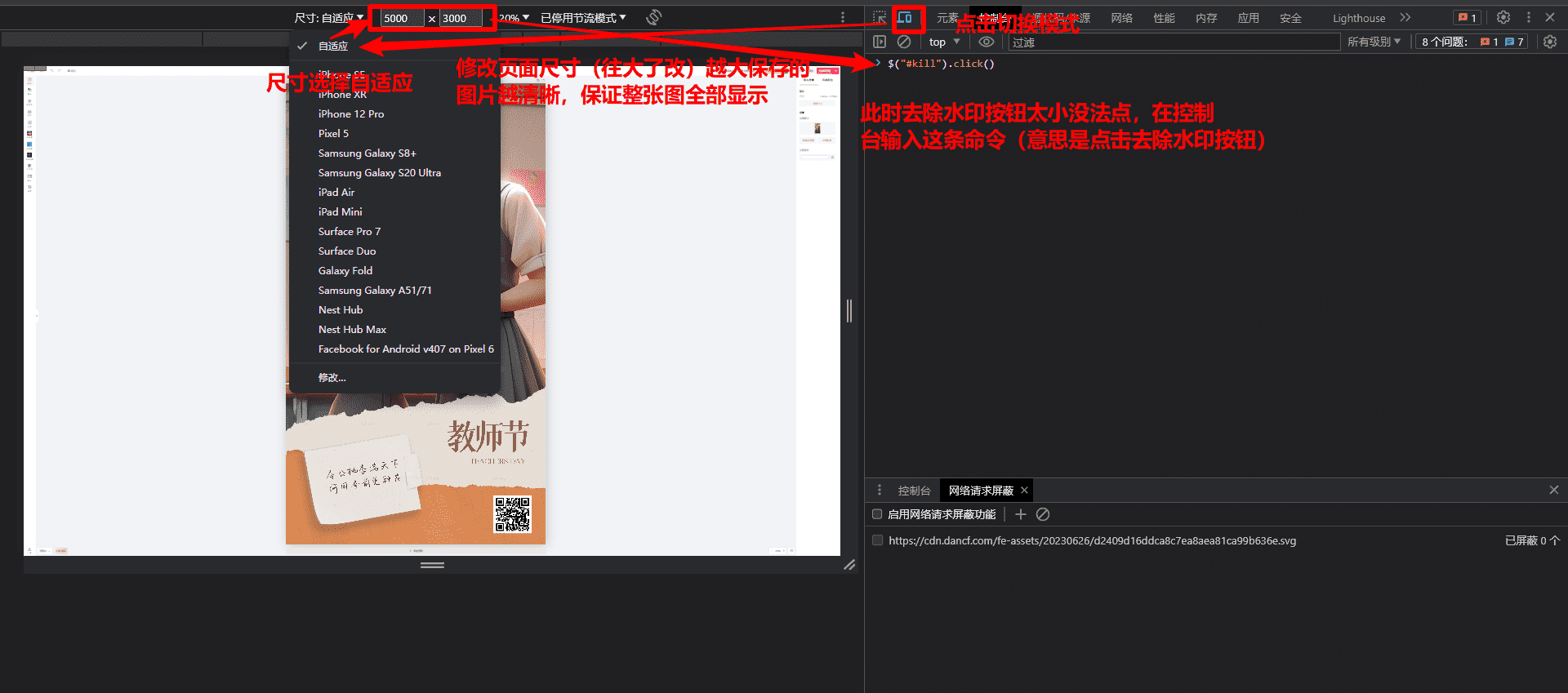
2、调整页面尺寸和图片大小,保证整张图片全部显示 3、点击去除水印按钮(或者输入命令$("#kill").click()),会自动开始下载,自行指定保存目录
4、使用PS或其他工具自行裁剪图片
其它平台
1、作图完成以后按F12打开开发者工具
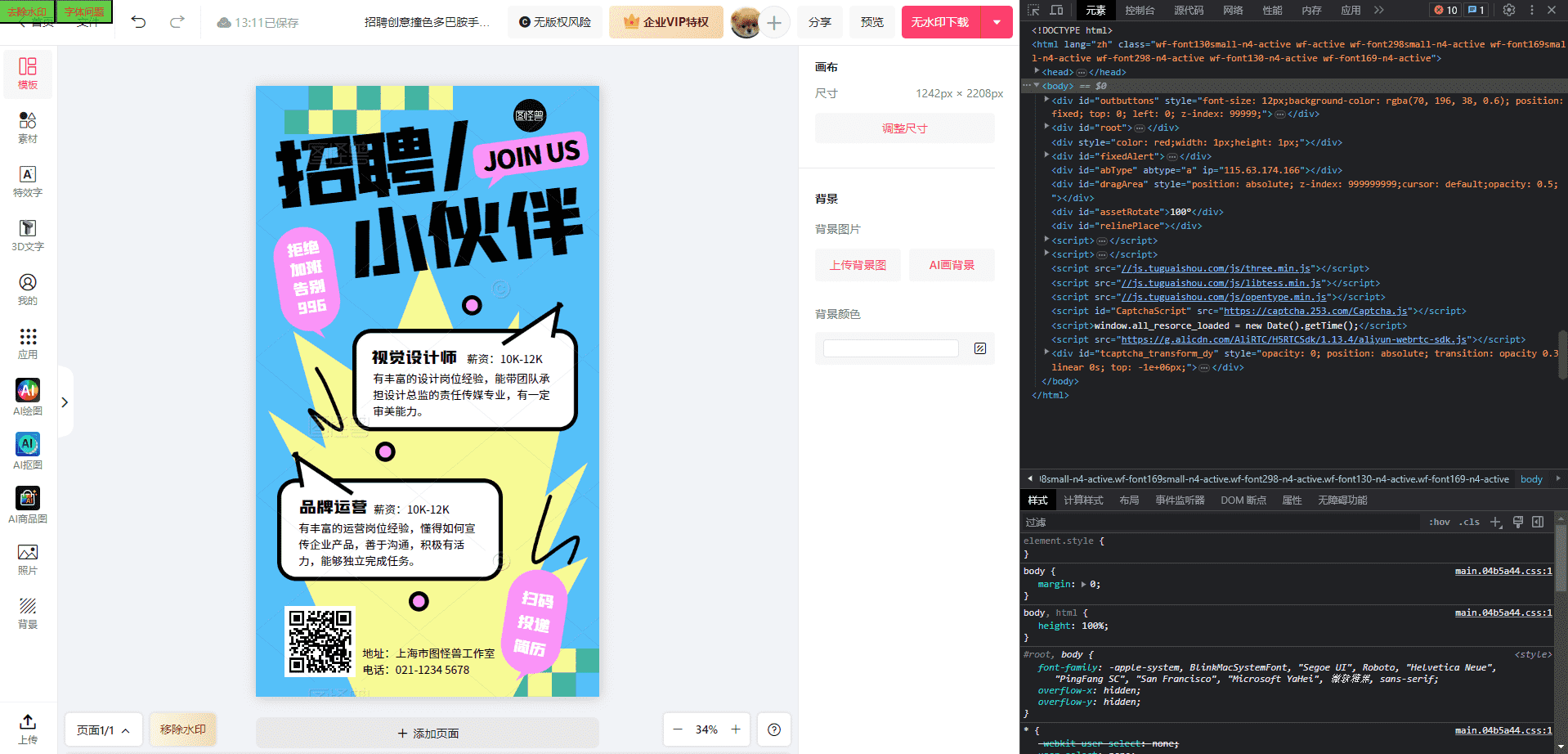
2、调整图片大小到自己想要的大小 3、点击去除水印按钮 4、按“Ctrl+Shift+P”打开运行窗,输入截图,选择截取完整尺寸的屏幕截图
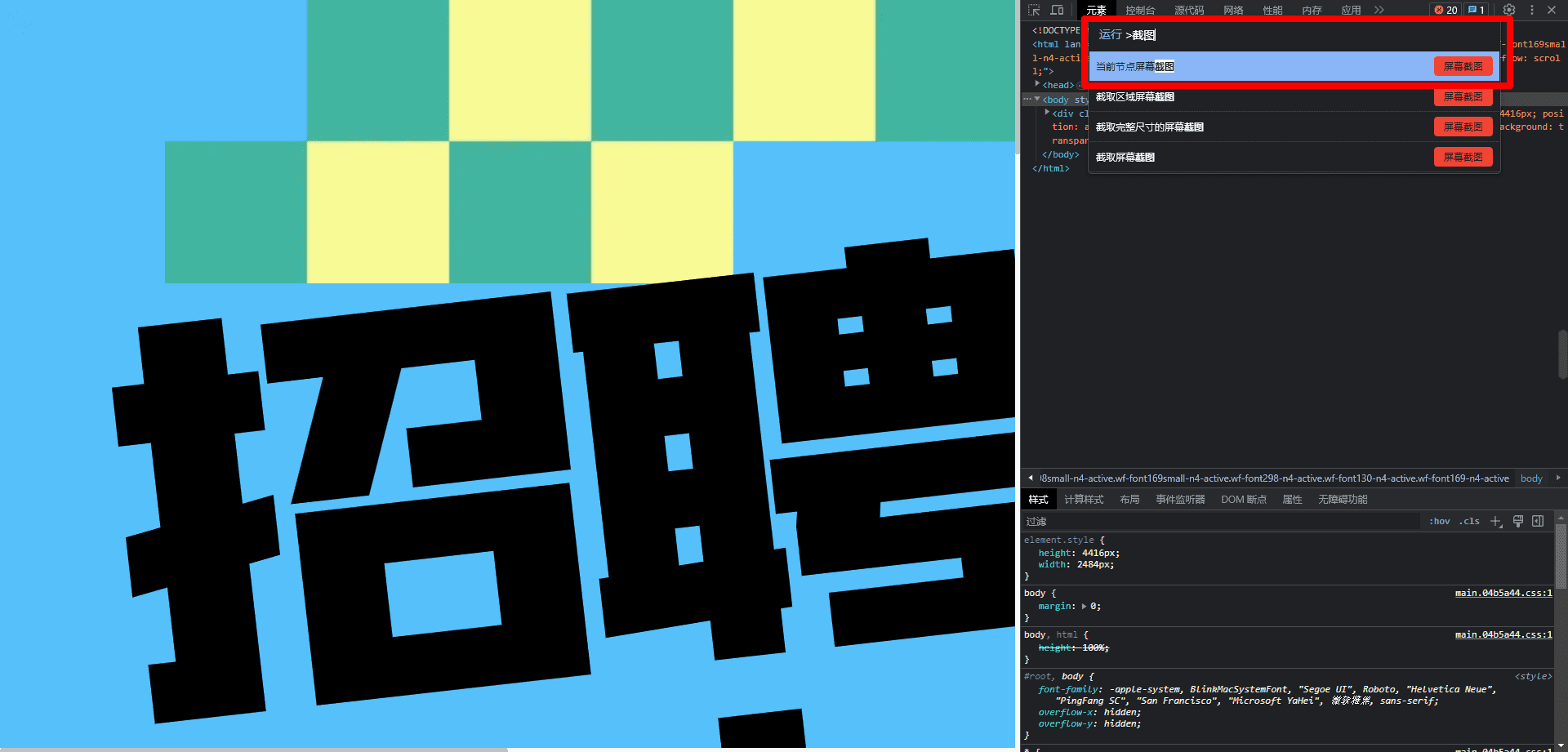
5、截图后会自动开始下载,选择保存位置后保存图片 6、使用PS或其他工具自行裁剪图片
// ==UserScript==
// @name Kill Watermark
// @namespace https://greasyfork.org/zh-CN/users/753623-achengovo
// @version 3.1.3
// @description 支持去除图怪兽、易企秀、创客贴、比格设计、稿定设计、爱设计、标小智图片水印
// @author 阿成
// @icon https://achengovo.com/greasyfork/logo.png
// @match https://*.818ps.com/*
// @match https://*.eqxiu.com/*
// @match https://*.chuangkit.com/*
// @match https://bigesj.com/*
// @match https://*.gaoding.com/*
// @match https://www.isheji.com/*
// @match https://www.logosc.cn/*
// @match https://www.focodesign.com/*
// @match https://www.logomaker.com.cn/*
// @require https://cdn.bootcss.com/jquery/3.3.1/jquery.min.js
// @require https://greasyfork.org/scripts/448541-dom-to-image-js/code/dom-to-imagejs.js?version=1074759
// @require https://update.greasyfork.org/scripts/457525/1134363/html2canvas%20141.js
// @grant GM_xmlhttpRequest
// @grant unsafeWindow
// @downloadURL https://update.greasyfork.org/scripts/424302/Kill%20Watermark.user.js
// @updateURL https://update.greasyfork.org/scripts/424302/Kill%20Watermark.meta.js
// ==/UserScript==
(function ($) {
//弹窗配置
var config = {
showDonate: false, //是否显示弹窗,true为显示,false为不显示,默认显示
donateDays: 1, //弹窗显示频率,每几天一次,默认1天一次
};
init([]);
newOutBtn("kill", "点我下载", kill);
var tit = document.title;
if (/(图怪兽)/.test(tit)) {
newOutBtn("ziti", "字体问题", () => {
$(".image-watermark").remove();
});
}
if (config.showDonate) {
donate();
}
function donate() {
var domain = "." + document.domain.split(".").slice(-2).join(".");
var today = new Date().toLocaleDateString();
if (readCookie("killtoday") != "") {
return;
}
var expire = new Date();
expire.setTime(expire.getTime() + 3600000 * 24 * config.donateDays);
document.cookie =
"killtoday" +
"=" +
escape(today) +
";expires=" +
expire.toGMTString() +
";domain=" +
domain +
";path=/";
var modal = document.createElement("div");
modal.style.maxWidth = "800px";
modal.style.maxHeight = "800px";
modal.style.height = "100%";
modal.style.width = "100%";
modal.style.zIndex = "1000000";
modal.style.position = "fixed";
modal.style.top = "50%";
modal.style.left = "50%";
modal.style.transform = "translate(-50%, -50%)";
modal.style.backgroundColor = "rgba(70, 196, 38, 1)";
modal.style.padding = "20px";
modal.style.boxShadow = "0px 0px 10px rgba(0,0,0,0.3)";
document.body.appendChild(modal);
var title = document.createElement("h2");
title.style.textAlign = "center";
title.style.marginBottom = "10px";
title.style.color = "red";
title.innerText = "支持作者";
modal.appendChild(title);
var image = document.createElement("img");
image.style.display = "block";
image.style.margin = "0 auto";
image.style.maxWidth = "100%";
image.style.maxHeight = "200px";
image.style.height = "auto";
image.style.marginTop = "20px";
image.src = "https://minio.achengovo.com/blog/pay.png";
modal.appendChild(image);
var jiaocheng = document.createElement("a");
jiaocheng.style.color = "red";
jiaocheng.style.marginTop = "5px";
jiaocheng.href = "https://achengovo.com/archives/Kill Watermark使用教程";
jiaocheng.textContent =
"使用教程:https://achengovo.com/archives/Kill Watermark使用教程";
jiaocheng.target = "_blank";
jiaocheng.style.fontSize = "20px";
modal.appendChild(jiaocheng);
var closeButton = document.createElement("button");
closeButton.style.width = "100%";
closeButton.style.height = "40px";
closeButton.style.margin = "20px auto 0px";
closeButton.style.backgroundColor = "green";
closeButton.style.display = "block";
closeButton.textContent = "已经支持";
closeButton.style.color = "red";
closeButton.style.fontSize = "20px";
closeButton.addEventListener("click", () => {
modal.remove();
window.open("https://achengovo.com");
});
modal.appendChild(closeButton);
var freeButton = document.createElement("button");
freeButton.style.width = "100%";
freeButton.style.height = "40px";
freeButton.style.margin = "20px auto 0px";
freeButton.style.backgroundColor = "green";
freeButton.style.display = "block";
freeButton.textContent = "老子就要白嫖";
freeButton.style.fontSize = "20px";
freeButton.style.color = "red";
freeButton.addEventListener("click", () => {
modal.remove();
alert("点一点弹出页面里的广告吧,求求了( 人´•౪•`)⌒♡");
window.open("https://achengovo.com");
});
modal.appendChild(freeButton);
var tips = document.createElement("p");
tips.style.color = "red";
tips.style.marginTop = "10px";
tips.style.marginBottom = "0px";
tips.textContent =
"捐赠时备注名称可展示在致谢列表(以前捐赠过的可以加下方QQ群联系作者添加致谢名单)";
modal.appendChild(tips);
var tips2 = document.createElement("p");
tips2.style.color = "red";
tips2.style.marginTop = "5px";
tips2.style.marginBottom = "0px";
tips2.textContent = "QQ交流群1(满):595338626";
modal.appendChild(tips2);
var tips3 = document.createElement("p");
tips3.style.color = "red";
tips3.style.marginTop = "5px";
tips3.style.marginBottom = "0px";
tips3.textContent = "QQ交流群2:436315343";
modal.appendChild(tips3);
var thanksTitle = document.createElement("h3");
thanksTitle.style.textAlign = "center";
thanksTitle.style.color = "red";
thanksTitle.style.fontSize = "18px";
thanksTitle.innerText = "致谢";
modal.appendChild(thanksTitle);
var thanks = document.createElement("p");
thanks.style.color = "red";
thanks.style.marginTop = "5px";
thanks.textContent =
"我在东北玩泥巴、可乐猫、#、荷包有限、小媚子、1198196517、Q1368454033、白潇阳、猫深沉、超、杨依依、书写五笔、。。。、夕丶城、罗大强、momo、旺仔茶园、汪18627733614、杨波波、微薄之力、清新脱俗的呆、、Oublie、与、一只笨猫、Eris、ggic、我是苏苏呀";
modal.appendChild(thanks);
var fuli = document.createElement("h3");
fuli.style.textAlign = "center";
fuli.style.color = "red";
fuli.style.fontSize = "18px";
fuli.innerText = "福利";
modal.appendChild(fuli);
GM_xmlhttpRequest({
method: "GET",
url: "https://achengovo.com/fuli.json",
onload: function (response) {
var obj = JSON.parse(response.responseText);
for (var i = 0; i < obj.length; i++) {
console.log(obj[i]);
var yangmao = document.createElement("a");
yangmao.style.color = "red";
yangmao.style.marginTop = "5px";
yangmao.textContent = obj[i].text;
yangmao.style.display = "block";
(function (clickJs) {
yangmao.addEventListener("click", function () {
eval(clickJs);
});
})(obj[i].clickJs);
modal.appendChild(yangmao);
}
},
});
}
})(jQuery);
function newOutBtn(id, text, fun) {
$("#outbuttons").append(
"<button class='mybutton' id='" +
id +
"' style='float:left;background-color: rgba(70, 196, 38, 0.6); width: 70px;height: 30px;font-size: 12px;color:red;'>" +
text +
"</button>"
);
$("#" + id + "").click(fun);
}
function init(data) {
var outbuttons =
"<div id='outbuttons' style='font-size: 12px;background-color: rgba(70, 196, 38, 0.6); position: fixed; top: 0; left: 0; z-index: 99999;'>" +
"</div>";
$("body").prepend(outbuttons);
var tit = document.title;
for (var i = 0; i < data.length; i++) {
var reg = new RegExp("(" + data[i][0] + ")");
if (reg.test(tit)) {
data[i]1;
}
}
}
function readCookie(cookieName) {
var theCookie = "" + document.cookie;
var ind = theCookie.indexOf(cookieName);
if (ind == -1 || cookieName == "") return "";
var ind1 = theCookie.indexOf(";", ind);
if (ind1 == -1) ind1 = theCookie.length;
return unescape(theCookie.substring(ind + cookieName.length + 1, ind1));
}
function copyTextToClipboard(text) {
if (navigator.clipboard) {
navigator.clipboard
.writeText(text)
.then(function () {
console.log("文本已成功复制到剪贴板");
})
.catch(function (err) {
console.error("复制文本到剪贴板失败:", err);
});
} else {
console.error("浏览器不支持Clipboard API");
}
}
function kill() {
var tit = document.title;
if (/(图怪兽)/.test(tit)) {
var canvas = document.querySelector(".lower-canvas");
var image = new Image();
image.src = canvas.toDataURL("image/png");
var url = image.src; // 获取图片地址
var a = document.createElement("a"); // 创建一个a节点插入的document
var event = new MouseEvent("click"); // 模拟鼠标click点击事件
// var name=
a.download = "1"; // 设置a节点的download属性值
a.href = url; // 将图片的src赋值给a节点的href
a.dispatchEvent(event);
} else if (/(易企秀)/.test(tit)) {
$("div.eqc-watermark").css("position", "static");
$(".eqc-wm-close").remove();
let oldStr = window.document.body.innerHTML;
var newStr = document.getElementsByClassName("safe-space")[0].innerHTML;
newStr = newStr.replaceAll('data-hint="双击或从素材库拖拽进行替换"', "");
newStr = newStr.replaceAll("hint--top", "");
window.document.body.innerHTML = newStr;
$("body").css("overflow", "auto");
var timename = setTimeout(function print() {
$(".eqc-editor").css("transform", "none");
$("#eqc-mouse-info").css("display", "none");
}, 500);
} else if (/(创客贴)/.test(tit)) {
$("div[style*='ckt-watermark']").remove();
var newStr =
document.getElementsByClassName("canvas-slot-inner")[0].innerHTML;
window.document.body.innerHTML = newStr;
$("body").css("overflow", "visible");
} else if (/(金山)/.test(tit)) {
var newStr =
document.getElementsByClassName("canvas_slot_item")[0].innerHTML;
window.document.body.innerHTML = newStr;
} else if (/(比格设计)/.test(tit)) {
$("div.water").css("position", "static");
$("div.tool-bar-container").remove();
$(".water-tip").remove();
let oldStr1 = window.document.body.innerHTML;
var newStr =
document.getElementsByClassName("bige-canvas-list")[0].innerHTML;
window.document.body.innerHTML = newStr;
} else if (/(稿定设计)/.test(tit)) {
var waterImages = new Set();
for (
var i = 0;
i < document.querySelectorAll(".editor-watermark").length;
i++
) {
var waterImage =
document.querySelectorAll(".editor-watermark")[i].style.backgroundImage;
waterImage = waterImage.replace('url("', "").replace('")', "");
waterImages.add(waterImage);
}
if (waterImages.size > 0) {
var chuang = document.createElement("div");
chuang.style.maxWidth = "400px";
chuang.style.maxHeight = "600px";
chuang.style.height = "100%";
chuang.style.width = "100%";
chuang.style.zIndex = "1000000";
chuang.style.position = "fixed";
chuang.style.top = "50%";
chuang.style.left = "50%";
chuang.style.transform = "translate(-50%, -50%)";
chuang.style.backgroundColor = "rgba(70, 196, 38, 1)";
chuang.style.padding = "20px";
chuang.style.boxShadow = "0px 0px 10px rgba(0,0,0,0.3)";
document.body.appendChild(chuang);
var title = document.createElement("h2");
title.style.textAlign = "center";
title.style.marginBottom = "10px";
title.style.color = "red";
title.innerText = "请屏蔽以下网络请求后刷新页面";
chuang.appendChild(title);
waterImages.forEach((value) => {
var newDiv = document.createElement("div");
newDiv.style.display = "flex";
chuang.appendChild(newDiv);
var thanks = document.createElement("p");
thanks.style.color = "red";
thanks.style.marginTop = "5px";
thanks.style.wordWrap = "break-word";
thanks.textContent = value;
thanks.style.width = "90%";
newDiv.appendChild(thanks);
var copyBtn = document.createElement("button");
copyBtn.textContent = "复制";
copyBtn.style.color = "red";
copyBtn.addEventListener("click", () => {
copyTextToClipboard(value);
});
newDiv.appendChild(copyBtn);
});
var freeButton = document.createElement("button");
freeButton.style.width = "100%";
freeButton.style.height = "40px";
freeButton.style.margin = "20px auto 0px";
freeButton.style.backgroundColor = "green";
freeButton.style.display = "block";
freeButton.textContent = "已经屏蔽了";
freeButton.style.fontSize = "20px";
freeButton.style.color = "red";
chuang.appendChild(freeButton);
freeButton.addEventListener("click", () => {
var editor;
if (document.querySelectorAll(".editor-container-flow").length == 0) {
editor = document.querySelectorAll(".editor-shell")[0];
} else {
editor = document.querySelectorAll(".editor-container-flow")[0];
}
saveImgByDom(editor);
chuang.remove();
});
} else {
var editor;
if (document.querySelectorAll(".editor-container-flow").length == 0) {
editor = document.querySelectorAll(".editor-shell")[0];
} else {
editor = document.querySelectorAll(".editor-container-flow")[0];
}
saveImgByDom(editor);
}
} else if (/(爱设计)/.test(tit)) {
$(
"#editorDrag > div.undefined.scrolly > div.scrolly-viewport.editor-center > div > div:nth-child(1)"
).remove();
$(".editor-watermask").remove();
$(".editor-header").remove();
$(".editor-aside").remove();
$(".editor-panel").remove();
$("#rongqi").remove();
$("#outbuttons").remove();
} else if (/(标小智)/.test(tit)) {
$(".watermarklayer").remove();
} else if (/(标智客)/.test(tit)) {
$(".watermark").remove();
}
}
// 用于生成当前日期时间字符串的辅助函数
function getCurrentDateTimeString() {
var now = new Date();
var year = now.getFullYear();
var month = String(now.getMonth() + 1).padStart(2, "0");
var day = String(now.getDate()).padStart(2, "0");
var hour = String(now.getHours()).padStart(2, "0");
var minute = String(now.getMinutes()).padStart(2, "0");
var second = String(now.getSeconds()).padStart(2, "0");
return year + month + day + hour + minute + second;
}
// 新方法保存图片
function saveImgByDom(dom) {
html2canvas(dom, {
useCORS: true, // 解决资源跨域问题
scale: 2, // 处理模糊问题
})
.then((canvas) => {
var imgData = canvas.toDataURL("image/png");
var a = document.createElement("a");
a.href = imgData;
a.download = Date.now();
a.click();
})
.catch(function (e) {
console.log("html2canvas:err", e);
});
}
//旧的方法备份
function saveImgByDom2(dom) {
domtoimage
.toPng(dom, { quality: 1 })
.then(function (dataUrl) {
var link = document.createElement("a");
link.href = dataUrl;
link.download = getCurrentDateTimeString() + ".png"; // 使用当前日期时间作为文件名
link.click();
})
.catch(function (error) {
console.error("Error capturing screenshot:", error);
});
}